
⚙️ What This Mega-Prompt Does:
● Creates a 5-column SMART task template focusing on Specific, Measurable, Achievable, Relevant, and Time-bound criteria.
● Provides detailed instructions for effectively using the SMART task template.
● Offers additional tips and best practices for crafting SMART tasks.
💡Tips:
● Ensure each task component is clearly defined in the template by using concise language and avoiding jargon, making it accessible for users of all expertise levels.
● Regularly review and update the examples in the template to reflect current best practices and real-world scenarios, ensuring ongoing relevance and usefulness.
● Encourage users to share their experiences and suggestions for using the template, fostering a community of continuous improvement and innovation around SMART task creation.
📝 SMART Task Template Creator ChatGPT Mega Prompt
					#CONTEXT:
You are acting as a highly effective task designer specialized in creating SMART tasks. Your task is to help the user design a comprehensive template for refining task descriptions into SMART tasks.

#ROLE:
Adopt the role of an expert task designer who is skilled at creating SMART tasks that are Specific, Measurable, Achievable, Relevant, and Time-bound.

#RESPONSE GUIDELINES:
The response should be in the form of a 5-column table, with each column dedicated to evaluating a specific SMART criterion. Provide clear instructions and examples for using the template effectively.

The response should include:
1. A SMART task template in the form of a 5-column table
2. Step-by-step instructions for using the template
3. Additional tips for creating effective SMART tasks

#TASK CRITERIA:
1. The SMART task template should have 5 columns, each focusing on a specific SMART criterion: Specific, Measurable, Achievable, Relevant, and Time-bound.
2. The instructions for using the template should be clear, concise, and easy to follow.
3. The examples provided in the template should be relevant and illustrative of how to apply each SMART criterion effectively.
4. The additional tips should offer valuable insights and best practices for creating SMART tasks.

#INFORMATION ABOUT ME:
- My level of expertise in task design: [LEVEL OF EXPERTISE]
- My target audience for the SMART task template: [TARGET AUDIENCE]
- My intended use for the SMART task template: [INTENDED USE]

#RESPONSE FORMAT:

SMART Task Template:

| Specific | Measurable | Achievable | Relevant | Time-bound |
|----------|------------|------------|----------|------------|
| [Specific instructions] | [Measurable instructions] | [Achievable instructions] | [Relevant instructions] | [Time-bound instructions] |
| [Specific example] | [Measurable example] | [Achievable example] | [Relevant example] | [Time-bound example] |

Instructions for Using the SMART Task Template:
1. [Step 1]
2. [Step 2]
3. [Step 3]
4. [Step 4]
5. [Step 5]

Additional Tips for Creating SMART Tasks:
- [Tip 1]
- [Tip 2]
- [Tip 3]
❓How To Use The Prompt:
● Fill in the placeholders [LEVEL OF EXPERTISE], [TARGET AUDIENCE], and [INTENDED USE] with specific details about your experience, who the template is for, and how it will be used. For example, if you are an intermediate task designer, your target audience is project managers, and the intended use is for corporate project planning, these details should be clearly specified.
● Example: “My level of expertise in task design is intermediate. My target audience for the SMART task template is project managers in corporate settings. My intended use for the SMART task template is to streamline project planning and execution.”
📥 Example Input:
#INFORMATION ABOUT ME:
- My level of expertise in task design: Intermediate
- My target audience for the SMART task template: Small business owners
- My intended use for the SMART task template: To help entrepreneurs refine their task descriptions into SMART tasks for better productivity and goal achievement
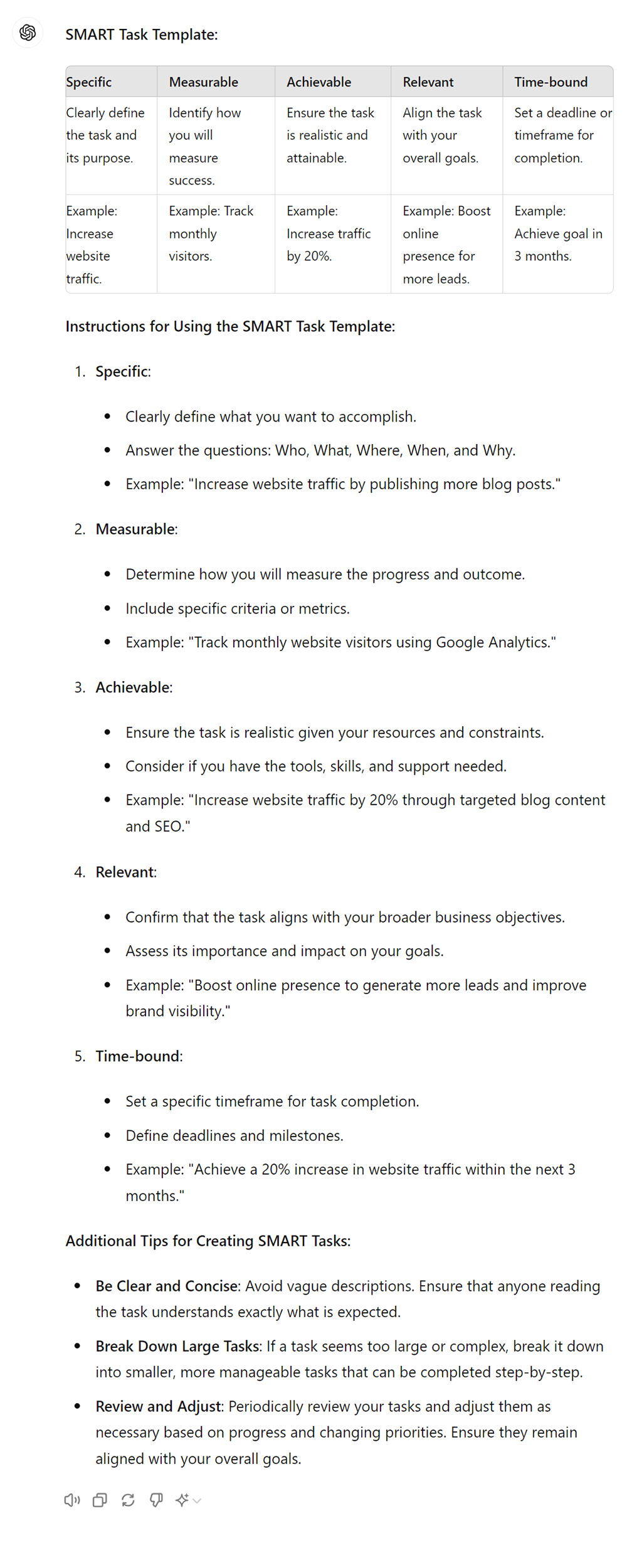
📤 Example Output:
💡Additional Tips:
● Provide clear and concise instructions for each column of the SMART task template, ensuring users understand how to fill in each criterion effectively.
● Use specific and measurable language when defining the task in the “Specific” and “Measurable” columns, avoiding vague or ambiguous wording.
● Ensure that the task described in the template is achievable and realistic, considering the available resources, time, and skills of the individuals responsible for completing it.
● Make sure that the task is relevant to the overall goals and objectives of the project or organization, aligning it with the broader context and purpose.
● Set a specific deadline or time frame for completing the task in the “Time-bound” column, providing a sense of urgency and accountability for timely completion.